::: THE PULSE OF THE SEARCH MARKETING COMMUNITY :::
A well-rounded view on search engines and search engine marketing by senior members of the major SEO/SEM forums on the Internet.
- Google Docs Launches New Interface - 2007-06-27 10:17:02-04
A Google Groups thread announces a new interface for Google Docs which happens to be miles better than the older interface. The Google Docs and Spreadsheets blog also covers the launch and redesign.
What has changed?
- There's a great new appearance.
- There are now folders for easy organization.
- The search function has improved.
- The interface now lets you view documents based on chronology, so you can see documents edited "today," "yesterday," "earlier this month," or "earlier this year."
- You can also sort by collaborator in shared documents.
Here's a screenshot of the new look of Google Docs:
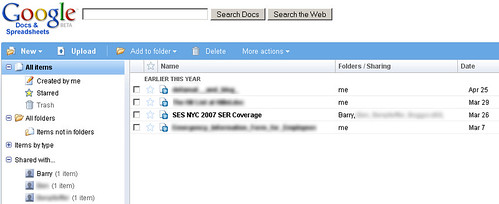
This interface is much improved over the old one. Great job, guys.
Forum discussion at Google Groups.
- Google AdWords Not Accepting New Click to Call Advertisers - 2007-06-27 10:28:42-04
We covered Google's Click to Call feature which adds an image of a phone next to an AdWords ad and gets users in touch with advertisers on Google's dime. In a Google Groups thread, a new advertiser is eager to sign up.
Unfortunately, however, she is unable to.
AdWordsPro writes in to say that Google is not accepting any new advertisers for the time being.
I am sorry to say that the click-to-call program is not accepting new advertisers at this point - and I am not yet aware of when this might change.
Forum discussion continues at Google Groups.
- Submit a Reconsideration Request to Google if You Buy a Banned Domain - 2007-06-27 11:02:50-04
A WebmasterWorld member is reporting that she has purchased a domain from a third-party domain provider and has built a website upon the domain that seems to be pretty Kosher. Her site, however, is not being indexed.
What she does know is that the Internet Wayback Machine indicates that the domain was spammy prior to her ownership of the domain. She, therefore, needs to submit a reinclusion request.
How do you do a reinclusion request? Go to Google Webmaster Central and click on Webmaster Tools. You will then see a list of sites you maintain and there is an option to "Submit a reconsideration request." This will only work if your site is verified.

On the next screen, you are instructed to only utilize the reconsideration request if your site had previously violated the guidelines (but was subsequently cleaned up) or if you recently acquired a domain which may have previously violated these guidelines. This appears to be the case for the WebmasterWorld member.

You can then select your verified site from the drop down and fill out information regarding why Google should reconsider it and you should be seeing a change within the next few weeks.

Google specifically has an option for submitting "reconsideration requests" for sites that you "recently acquired which you suspect may have previously violated" Google's webmaster guidelines.
Forum discussion at WebmasterWorld.

No comments:
Post a Comment